APEXREST
On this page


An Oracle APEX plugin for Codex and Claude Code: build and change APEX applications from a conversation, from APEXlang source to a verified import.
Features and videos · Get started · Documentation · Deployment safety · Release notes
What it is
Oracle APEX is a low-code platform for business web applications on Oracle Database. APEX 26.1 and 26.2 can express an application as APEXlang, a readable text source that a coding agent can edit like any other code.
APEXREST lets that agent do the work well. One plugin installs into Codex (desktop app and CLI) and Claude Code. Its six skills and twelve MCP tools run on a shared runtime that drives Oracle SQLcl. The same operations are available as the apexrest CLI for scripts, CI and Codex Cloud.
You ask for a change, such as "add an order status report". The agent then:
- writes APEXlang grounded in an offline library of Oracle definitions and compiler-checked recipes;
- renders the pages locally without a database;
- validates the sources with the official Oracle compiler;
- imports only the changed pages and components into a development or test application, after an exact plan and a backup;
- checks the result in a browser, when you ask it to.
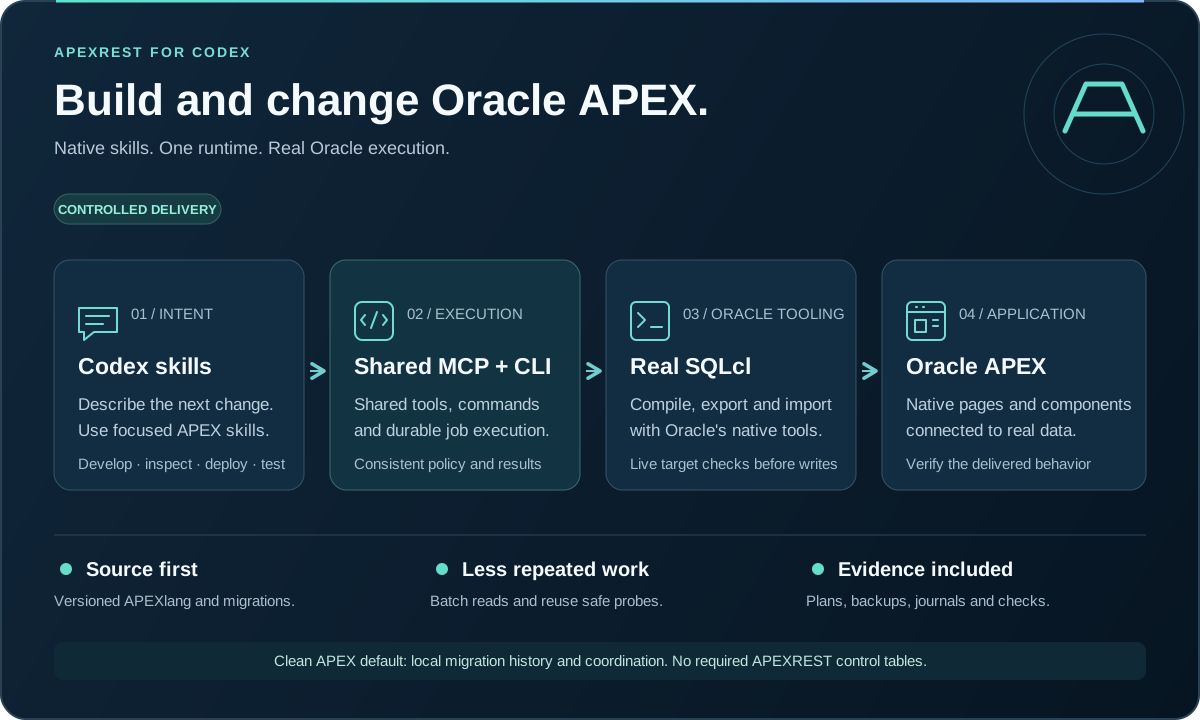
Features
- Component library. 389 pinned Oracle 26.2 definitions, 269 compiler-checked component recipes, UX patterns and 1,350 public Oracle pages, searchable in English or Ukrainian.
- Decisions API selection. Optional OpenAI ranking of catalog components before generation. A one-page pilot cut active time by 48%.
- Local preview. Run APEXlang on Node.js and SQLite with the genuine Universal Theme 26.2: reports, grids, forms, items, charts, calendars, maps, dynamic actions and a PL/SQL interpreter.
- Real compiler validation. Structured diagnostics with file, line, column and valid values.
- Partial imports on APEX 26.2. Import only the changed pages and shared components, with drift and conflict checks.
- Safe deployment. Exact 30-minute plans, backups, drift detection and recovery from unknown outcomes. DEV, QA and TEST targets only.
- Direct or ORDS access. Reach the database through the Oracle listener or REST-Enabled SQL over HTTPS.
- Two providers, one team. Work in Claude Code with Codex as the reviewer, or in Codex with Claude Code. The second agent reviews each deployment plan read-only under your own subscription or API key; set
peerReview.mode: requiredto block deployment until it approves. See peer review.
Watch the short videos and read the details on Features and videos.
Requirements
- Codex with native plugin support, or Claude Code.
- Node.js 24 LTS; Node 24–26 is supported.
- For Oracle work: Java 21 and SQLcl, which the setup skill can install for you. Use SQLcl 26.1.2 for APEX 26.1 and SQLcl 26.3 for APEX 26.2.
- A development or test APEX application. APEXREST never deploys to production.
The local preview needs neither Java nor SQLcl.
Install
Codex:
codex plugin marketplace add apexrest-dev/apexrest
codex plugin add apexrest-apex@apexrest
Claude Code:
claude plugin marketplace add apexrest-dev/apexrest
claude plugin install apexrest@apexrest
CLI only (optional; the same runtime without a host plugin):
npm install -g apexrest
The repository ships the built plugin under plugins/apexrest-apex, so you need no build step. To install from a local checkout, pass its path to marketplace add. Registry packages can lag the source; this README describes source version 2.5.0.
Quick start
Start a new Codex or Claude Code session and check your setup:
Use APEXREST to check my setup. Report the compiler, connection and target checks that still need attention.
If Java or SQLcl is missing, the agent previews the bundled installer and runs it with your consent. Installation never creates a database or deploys an application.
Describe a change, or invoke the work skill:
$apexrest-workin Codex,/apexrest:apexrest-workin Claude Code.Add an order status report to page 10 of the DEV application and show it to me in the browser.
The agent edits the APEXlang sources, previews the pages, validates and ships. It then reports the changed files, the validation result, the import status and what it checked in the browser.
An explicit request to change an identified DEV/QA/TEST application authorizes that import. The getting started guide covers connections, new and existing applications, and removal.
Documentation
- Features and videos: component library, Decisions selection, local preview, connected preview (part 2), partial imports, tools and skills.
- Getting started: install, connect, create or adopt an application, ship and verify.
- Local preview: run APEXlang without a database.
- Configuration: environments, connection references, trust policy and deployment coordination.
- Deployment safety: plans, backups, drift and authorization rules.
- Codex Cloud: run the CLI in a Cloud container over ORDS.
- Troubleshooting: setup, compiler, authorization and recovery diagnostics.
- Verification status: what has been checked, and how.
Development
Use Node 24 LTS and the committed lockfile:
npm ci --ignore-scripts
npm run build
npm run test:unit
Run npm run plugin:sync after source, skill or resource changes to refresh the checked-in bundle. See contributing and testing for the full set of checks.
Support and license
Report reproducible bugs through GitHub issues with sanitized diagnostics, and follow SECURITY.md for sensitive reports. Licensed under Apache-2.0.
APEXREST is independent tooling, not an official Oracle, OpenAI or Anthropic product.